
Engineering notes
A correct transcript doesn't prove clean audio
The words were recognizable. A listener still heard an awkward break. We kept the recordings and checked where the evidence led.
We were editing a short recording of a voice-agent demonstration. Speech recognition recovered the words around the key sentence correctly. A listener still heard an awkward break between “assessment” and “tomorrow.”
The transcript answered one question: could the words be recovered? We also needed to check the sound and determine where the defect entered the recording.
Keep evidence from several stages
For this investigation, the path was:
- A generated caller audio file, played into a browser's synthetic microphone.
- Browser capture, processing and encoding.
- WebRTC transport and the media server.
- Receiving clients, playout and recording. We captured a browser mix with
MediaRecorderand also retained a server-side recording. - Editing, concatenation and final encoding.
A clean source file does not establish that every later stage preserved it. A server recording is another observation point, with its own processing and encoder. It is not necessarily the raw output of the voice model.
Keep those files before removing a test fixture. We had already deleted the first call's server recording during cleanup, which limited what we could establish about that call.
Flag suspicious silence
We used a small scanner to flag near-zero sample runs lasting 15–500 milliseconds, with louder audio nearby. This is a way to find regions worth inspecting. It does not identify missing packets or understand whether a pause was intentional.
The example needs FFmpeg and NumPy. It decodes to mono, 48 kHz, signed 16-bit little-endian PCM and loads the whole result into memory, so use short recordings or extracted clips. A decoder failure must fail the scan rather than quietly produce “no findings.”
Save the example as gap_scan.py and run python gap_scan.py your-recording.wav. You can also download the scanner.
import subprocess
import sys

import numpy as np

SR = 48_000
WINDOW = SR // 100  # 10 milliseconds
source = sys.argv[1]
threshold_db = float(sys.argv[2]) if len(sys.argv) > 2 else -35.0

decoded = subprocess.run(
    ["ffmpeg", "-v", "error", "-i", source, "-vn", "-ac", "1",
     "-ar", str(SR), "-f", "s16le", "-"],
    capture_output=True,
    check=True,
)
x = np.frombuffer(decoded.stdout, dtype="<i2").astype(np.int32)
if not x.size:
    raise ValueError("No decoded audio samples")

def level_db(samples):
    rms = np.sqrt(np.mean((samples / 32768.0) ** 2))
    return 20 * np.log10(rms + 1e-9)

def loudest(start, end):
    start, end = max(0, start), min(len(x), end)
    return max(
        (level_db(x[i:i + WINDOW])
         for i in range(start, end - WINDOW + 1, WINDOW)),
        default=-200.0,
    )

# Widen to int32 before abs(): abs(-32768) overflows an int16.
near_zero = (np.abs(x) <= 1).astype(np.int8)
edges = np.diff(np.concatenate(([0], near_zero, [0])))
runs = []
for start, end in zip(np.flatnonzero(edges == 1), np.flatnonzero(edges == -1)):
    if end - start < int(0.004 * SR):
        continue
    if runs and start - runs[-1][1] < int(0.006 * SR):
        runs[-1][1] = end
    else:
        runs.append([start, end])

radius = int(0.3 * SR)
for start, end in runs:
    duration_ms = (end - start) * 1000 / SR
    if (15 <= duration_ms <= 500
            and loudest(start - radius, start) > threshold_db
            and loudest(end, end + radius) > threshold_db):
        print(f"candidate at {start / SR:.3f}s: {duration_ms:.0f}ms")
The merged intervals can contain brief nonzero samples between neighboring blocks. Report them as near-zero regions rather than claiming that every sample in the reported interval is exactly zero.
What the recordings showed
In the original browser recording, the awkward transition included roughly 120 milliseconds of near-zero audio. The scan also flagged another region in the agent's speech. The same transition was present before our final edit, so that edit was not where it first appeared.
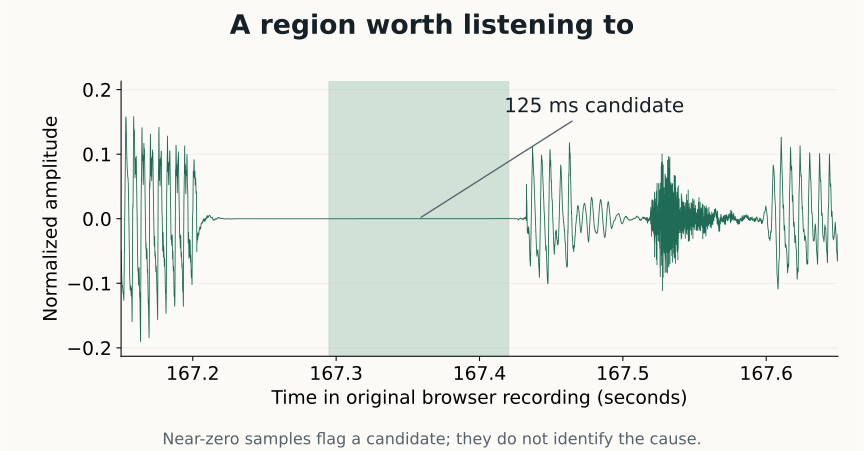
Some runs lined up with 20-millisecond boundaries. That is compatible with audio-frame processing, but frame-sized silence is not proof of packet loss. Noise suppression, discontinuous transmission, playback and recording can all affect silent regions. Without the original call's server recording, we left its cause unresolved.
For a new call, we retained both recordings and the synthetic caller's source WAVs. We aligned shared speech by cross-correlation before comparing timestamps; the files did not start at the same instant.
The selected agent-response segment had no flagged gaps in either recording. Elsewhere, the server recording contained two short near-zero regions in caller speech, approximately 26 and 16 milliseconds. The browser recording had longer regions near the corresponding positions. The source WAVs did not have matching zero runs.
That narrowed the investigation to the paths after source-file generation. It did not identify a single faulty component. The browser and server recordings used different encoders, so comparing zero-run lengths alone could not tell us exactly where silence was introduced or extended.
Check the edit separately
We found a second issue in our own assembly. Stream-copy concatenation of separately encoded segments added approximately 20–35 milliseconds at two joins. At one join, a level-based scan reported 151 milliseconds, but 117 milliseconds of that was a deliberate lead-in already present in the source segment.
That distinction mattered: fixing the entire flagged interval would have removed part of the intended timing.
Decoding and joining the segments through FFmpeg's concat filter removed the additional join gaps in our comparison. Encoder padding or timestamp handling was a plausible explanation; we did not isolate which was responsible.
For inputs with matching dimensions, frame rate, sample rate and channel layout, the pattern is:
ffmpeg -i a.mp4 -i b.mp4 -filter_complex \
  "[0:v]setpts=PTS-STARTPTS[v0];[0:a]asetpts=PTS-STARTPTS[a0]; \
   [1:v]setpts=PTS-STARTPTS[v1];[1:a]asetpts=PTS-STARTPTS[a1]; \
   [v0][a0][v1][a1]concat=n=2:v=1:a=1[v][a]" \
  -map "[v]" -map "[a]" -c:v libx264 -c:a aac out.mp4
Check the inputs first. The concat filter requires segments to start at timestamp zero, and differing input characteristics may need normalization. It can also pad a shorter audio stream to match its segment. Re-encoding is not a universal guarantee of clean joins. FFmpeg concat documentation
Use scans to guide a review
Our working process is to retain source and paired recordings, align them, inspect flagged regions in context, check edit joins, and listen to the final export.
The limitations are substantial:
- A silence scanner does not detect clicks, robotic smearing or all packet-loss-concealment artifacts.
- It measures levels, not speech. A loud effect followed by an intentional pause can trigger it.
- Noise gates and generated speech can contain legitimate zero-valued pauses.
- Mixing to mono can hide or create cancellation; inspect channels separately when necessary.
- Thresholds and lossy re-encoding change what gets flagged.
- These observations came from a small number of calls, not a benchmark.
In this case, recognizing all the words was a useful check. It was not sufficient evidence that the exported speech sounded clean.